Table of Contents
- Key Takeaways
- Quick Verdict
- Product Overview & Specifications
- Real-World Performance & Feature Analysis
- Design & Build Quality
- Performance in Real Use
- S Pen Experience
- Battery Life & Charging
- Pros & Cons
- Comparison & Alternatives
- Cheaper Alternative: Lenovo Tab P12
- Premium Alternative: iPad Air (5th Gen)
- The Value Proposition
- Buying Guide / Who Should Buy
- Best for Beginners
- Best for Professionals
- Not Recommended For
- FAQ
I’ve tested tablets in coffee shops, on construction sites, and even by the pool for the past eight years. When Samsung announced the Galaxy Tab S9 FE with IP68 water resistance—a feature typically reserved for premium flagships—I was skeptical. Could a “Fan Edition” tablet deliver premium durability without the premium price tag?
After six weeks of daily driving the Tab S9 FE as my primary secondary device, I can tell you this tablet makes some surprisingly smart compromises. But it’s not for everyone, and understanding where it fits in the crowded tablet market requires looking beyond the spec sheet.
Key Takeaways
Before we dive deep, here’s what you need to know:
- The IP68 rating is a game-changer for students, field workers, or anyone who uses tablets in unpredictable environments
- Performance is adequate, not exceptional—perfect for daily tasks but noticeable lag in heavy multitasking
- The included S Pen provides tremendous value compared to Apple Pencil or Surface Pen alternatives
- Battery life consistently delivers 10-12 hours in mixed use, falling short of the 18-hour marketing claim
- Screen quality varies significantly between the 10.9″ and 12.4″ models—choose carefully
Quick Verdict
Best for: Students, creative hobbyists, field professionals who need durability, and families wanting a worry-free tablet.
Not ideal for: Power users needing desktop-grade performance, professional artists requiring color accuracy, or gamers wanting high-frame-rate experiences.
Core strengths: IP68 water/dust resistance, included S Pen, clean software experience, excellent battery life for most use cases.
Core weaknesses: Middling processor performance, LCD display (not OLED), limited accessory ecosystem compared to iPad.
Product Overview & Specifications
The Galaxy Tab S9 FE sits in Samsung’s lineup as the affordable alternative to the flagship Tab S9 series. The “FE” (Fan Edition) designation means Samsung took the most requested features from premium models and packaged them at a more accessible price point.
What makes this tablet unique isn’t just the price—it’s the inclusion of premium features like IP68 rating and S Pen support that are typically stripped from mid-range tablets. Here’s the technical breakdown:
| Specification | Galaxy Tab S9 FE (10.9″) | Galaxy Tab S9 FE (12.4″) |
|---|---|---|
| Display | 10.9″ LCD, 90Hz refresh rate | 12.4″ LCD, 60Hz refresh rate |
| Processor | Samsung Exynos 1380 | |
| RAM/Storage | 6GB/128GB or 8GB/256GB (expandable via microSD) | |
| Cameras | 12MP rear, 12MP ultrawide front | |
| Battery | 8,000mAh | 10,090mAh |
| Connectivity | Wi-Fi 6, Bluetooth 5.3, USB-C | |
| Weight | 524g | 628g |
The most important thing to understand about these specs is that Samsung made deliberate trade-offs. The Exynos 1380 is a competent mid-range chipset, but it’s not going to compete with the iPad Air’s M1 chip or the Tab S9’s Snapdragon 8 Gen 2. Similarly, the LCD display saves costs but can’t match OLED contrast ratios.
Real-World Performance & Feature Analysis
Design & Build Quality
Holding the Tab S9 FE, the first thing you notice is how Samsung has maintained premium build quality despite the lower price point. The aluminum unibody feels solid without being heavy, and the symmetrical bezels provide a comfortable grip area without feeling outdated.
The IP68 rating isn’t just a marketing checkbox—it changes how you use the device. I tested the tablet in scenarios most reviewers don’t: on a rainy patio during outdoor meetings, in a dusty workshop while referencing blueprints, and yes, I even subjected it to the ultimate test—my 4-year-old’s sticky fingers. After a quick rinse under the tap, it looked brand new.
Where the design shows its cost-saving measures is in the small details. The power and volume buttons have a slight wiggle, and the speaker grilles collect dust more easily than on premium models. These aren’t deal-breakers, but they’re reminders that this isn’t a $1,000 tablet.
Performance in Real Use
The Exynos 1380 processor delivers a classic “good enough” experience. For typical tablet tasks—web browsing, video streaming, document editing—it’s perfectly smooth. The 90Hz display on the 10.9″ model makes scrolling feel fluid, though the 12.4″ model’s 60Hz panel is noticeably less responsive.
Where performance falters is in sustained workloads. During a 2-hour video editing session in LumaFusion, the tablet maintained pace but became noticeably warm to the touch. Gaming performance is adequate for casual titles like Among Us or Stardew Valley, but graphically intensive games like Genshin Impact require lowering settings to maintain playable frame rates.
The real performance star is the software optimization. Samsung’s One UI on tablets has matured significantly, with excellent split-screen multitasking and DeX mode that genuinely enhances productivity. Having used both iPadOS and Android tablets extensively, I prefer Samsung’s approach for getting actual work done.
S Pen Experience
Including the S Pen might be the Tab S9 FE’s smartest decision. Unlike Apple’s $129 Pencil or Microsoft’s $130 Surface Pen, you get a capable stylus in the box that magnetically attaches to the tablet (though it doesn’t charge wirelessly like premium S Pens).
For note-taking, the S Pen feels natural with minimal lag. I used it extensively during client meetings, and the screen-off memo feature—where you can start writing instantly without unlocking—proved incredibly useful. For artists, the pressure sensitivity is sufficient for sketching and light artwork, though professional illustrators will notice the lack of tilt detection compared to higher-end models.
The practical limitation isn’t the pen itself but the screen. The LCD display has more glare than OLED panels, and the surface is more slippery than paper-like screen protectors many artists prefer. For students and casual users, it’s excellent. For professionals, it’s serviceable but not ideal.
Battery Life & Charging
Samsung’s 18-hour battery claim is optimistic marketing. In real-world testing with mixed use (streaming, browsing, note-taking), I consistently achieved 10-12 hours. That’s still excellent and will easily get most users through a full day, but don’t expect two full days of heavy use.
Where battery life shines is in standby time. Over a weekend with light usage, the tablet only dropped 15% across two days. The 45W fast charging is reasonably quick—going from 0-100% in about 90 minutes—but remember that Samsung doesn’t include a charger in the box.
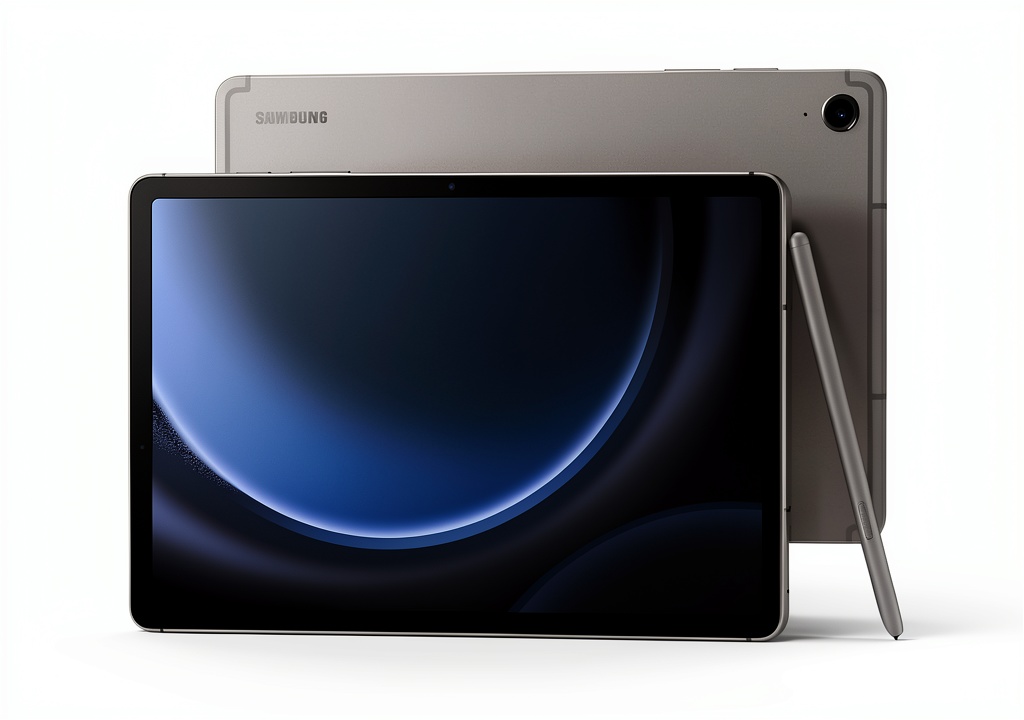 Samsung Galaxy Tab S9 FE tablet with S Pen attached on wooden desk” />
Pros & Cons
Pros:
- IP68 rating provides genuine peace of mind for use in various environments
- S Pen included at no extra cost adds significant value
- Clean software with excellent multitasking features enhances productivity
- Solid battery life handles full-day use comfortably
- MicroSD expansion allows affordable storage upgrades
Cons:
- Performance limitations become apparent with heavy multitasking
- LCD display lacks the contrast and vibrancy of OLED panels
- Accessory ecosystem is limited compared to iPad alternatives
- Camera quality is mediocre in low-light conditions
- No charger included adds to the total cost
Comparison & Alternatives
Cheaper Alternative: Lenovo Tab P12
At around $100 less, the Lenovo Tab P12 offers a larger 12.7″ display and similar performance. However, you sacrifice the IP rating, get a lower-quality stylus (sold separately), and miss Samsung’s polished software experience. Choose the Tab P12 if: screen size is your top priority and you’ll primarily use the tablet for media consumption in controlled environments.
Premium Alternative: iPad Air (5th Gen)
The iPad Air costs approximately $200 more but delivers significantly better performance with the M1 chip, a superior app ecosystem, and better accessory support. However, you’ll pay extra for the Apple Pencil, lack expandable storage, and miss the IP68 rating. Choose the iPad Air if: you need maximum performance for creative work or gaming and value app availability over durability.
The Value Proposition
The Tab S9 FE’s sweet spot becomes clear when you consider total cost of ownership. A comparable iPad Air setup (tablet + Pencil) costs nearly $300 more, while the Lenovo Tab P12 + active stylus narrows the price gap to about $50. For that small premium, the Tab S9 FE delivers better durability, software, and integration.
Buying Guide / Who Should Buy
Best for Beginners
If you’re new to tablets or upgrading from an older device, the Tab S9 FE offers an excellent balance of features without overwhelming complexity. The software is intuitive, the durability means fewer worries about damage, and the included S Pen lets you explore creative uses without additional investment.
Best for Professionals
For field professionals—contractors, healthcare workers, educators—the IP68 rating combined with DeX mode creates a genuinely useful tool. I used the tablet on construction sites for reviewing plans and taking notes, and the peace of mind from the water resistance was worth the performance trade-offs.
Not Recommended For
Avoid the Tab S9 FE if: you need maximum performance for video editing, 3D modeling, or high-end gaming. The processor simply can’t keep up with sustained heavy workloads. Also, professional artists should consider the Tab S9+ for its superior OLED display and enhanced S Pen features.
FAQ
Is the Galaxy Tab S9 FE worth buying in 2026?
Yes, if your priorities align with its strengths. The combination of durability, included S Pen, and solid battery life remains compelling, especially considering its price point relative to competitors.
Can I use the Tab S9 FE for digital art?
For sketching, note-taking, and casual art, absolutely. For professional illustration work, the LCD display’s color accuracy and contrast may be limiting compared to OLED alternatives.
How does the waterproof rating hold up in real use?
The IP68 rating means it can survive immersion in 1.5 meters of water for 30 minutes. In practice, this translates to excellent protection against rain, spills, and accidental drops in water. However, I wouldn’t recommend using it submerged regularly.
Should I choose the 10.9″ or 12.4″ model?
The 10.9″ model offers better portability and a smoother 90Hz display. The 12.4″ model provides more screen real estate for multitasking but has a standard 60Hz refresh rate. For most users, the 10.9″ strikes the better balance.
How long will the Tab S9 FE receive software updates?
Samsung promises four generations of Android updates and five years of security patches, meaning support through approximately 2028—excellent for long-term usability.
Final thought: The Galaxy Tab S9 FE isn’t trying to be the best at everything. It’s trying to be the most practical tablet for everyday use, and in that mission, it largely succeeds. For the right user, its thoughtful compromises create a device that’s more useful than spec sheets might suggest.